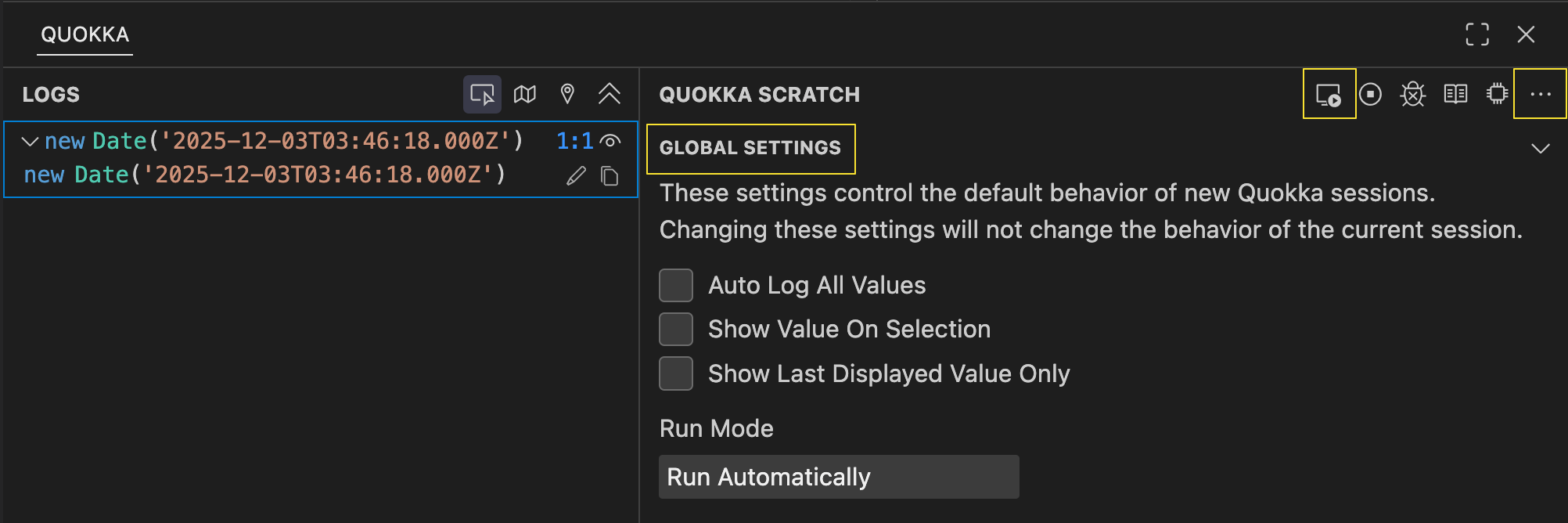
New Run Mode Global Setting
A new Run Mode global setting can be used to control Quokka’s execution behavior on startup. The runMode setting can be set to auto (default), onsave, or ondemand to control how Quokka executes code when it starts up. This new setting allows you to always start Quokka in your preferred mode without needing to manually change it each time you start a new session.
If you prefer to only occasionally run in a specific mode, you can start Quokka in a specific run mode at any time using the Quokka.js: Start <Run Mode> for Current File commands.
As a part of these changes, we’ve also introduced a number of improvements to Quokka’s user interface to make it easier to set the default run mode, and to switch between run modes while Quokka is running:
- The current Run Mode for your session can also be changed at any time by clicking on the new
Run Mode Options(left-most) icon in the right-hand panel of the Quokka UI. - The settings page has been updated to allow you to modify global settings (including the
Run Mode) without needing to edit the configuration file. - Session settings for
Auto Log All Values,Show Value on SelectionandShow Last Displayed Value Onlyhave been moved to the ellipsis menu in the Quokka Scratch section of the UI.